EcoNet
- 4.0
- Rating
- 100.00K
- Installs
- Free
- Price

 Analysis by App-foxy
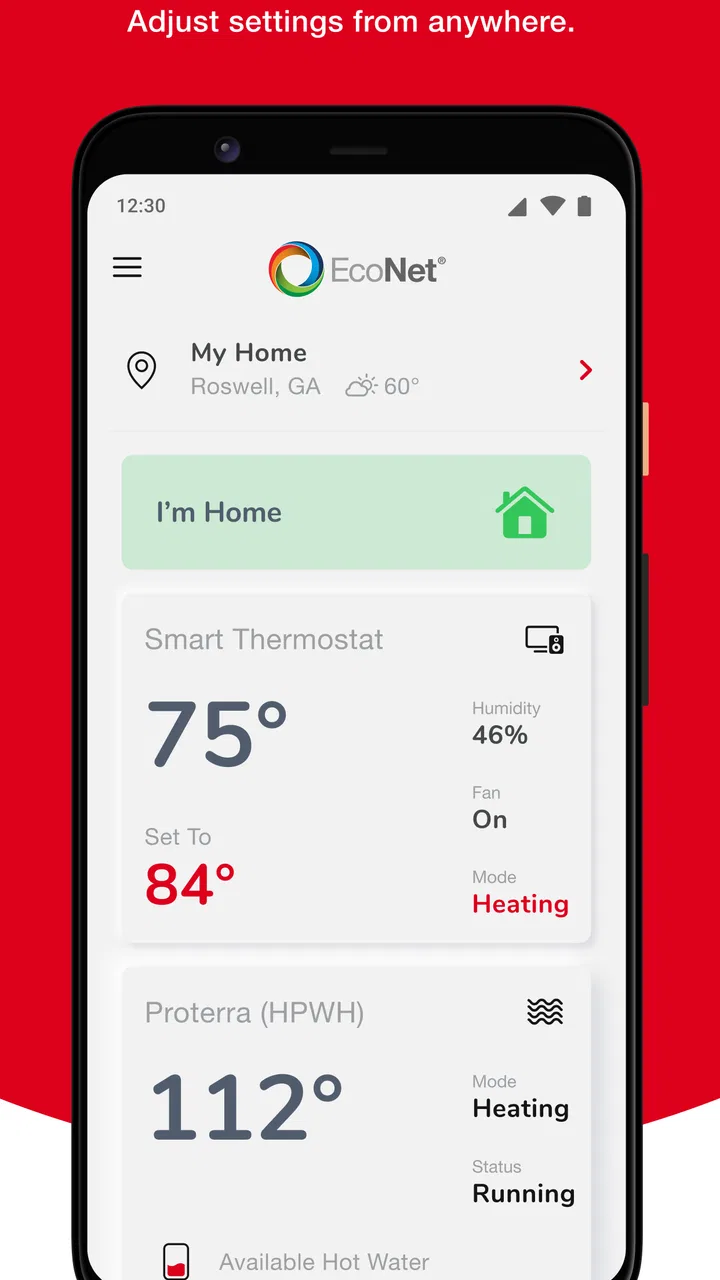
Managing heating, cooling, and hot water usually means reacting to a problem after it has already become uncomfortable: the house feels cold, the air conditioner is running longer than expected, or someone discovers there is not enough hot water. EcoNet takes a different approach by putting Rheem-connected HVAC and water-heating controls in one mobile app. I found it most useful as a practical remote-control layer for a Rheem home system, rather than as a replacement for a complete smart-home platform.
Developed by Rheem Manufacturing, this free House & Home app is aimed at consumers who want to check and adjust compatible equipment from a phone. It has been available since June 2, 2014, and its current version is 6.15.0-10139-aca6798. The app is rated for Everyone, which fits its straightforward household purpose, although the real question is not age or technical ability. The important question is whether your installed Rheem equipment can actually work with EcoNet.
From an uncomfortable room to a controlled home
I start with the moment that makes remote control appealing: a room feels uncomfortable, but the thermostat is elsewhere or plans have changed. This section looks at what needs to be in place before a phone can help, and why checking equipment compatibility is a better first move than expecting an app alone to solve the problem.
You May Also Like

 Blood Strike: 2.5 Anniversary
Blood Strike’s Loadouts Turn Every Drop Into a Tactical Gamble
A close look at Blood Strike’s custom loadouts: how fast access to signature weapons reshapes its battle royale rhythm, rewards preparation, and narrows the gap between fights.

 Pandora - Music & Podcasts
Pandora’s Music Is Easy to Start, but Harder to Recover
Pandora’s strength is its low-effort path from a seed to a station. Its weak spot is how much confidence it asks you to place in connection, setup, and quiet recovery.

 8 Ball Pool
 Is Built on Rivalries, Rematches, and Routine
A close look at the rivalries, rematches, shared routines, and unanswered safety questions that turn a quick pool match into a persistent mobile community.

 Samsung Music
’s Quiet Strength Is Playing What You Already Own
Its reach comes less from spectacle than from dependable access to a personal library. That simplicity is both the app’s strongest retention engine and its ceiling.

 AccuWeather: Weather Radar
AccuWeather Review: A Quick, Clear Forecast for Everyday Decisions
For everyday plans, the best forecast is the one you can understand quickly. AccuWeather makes rain timing, radar, and local conditions easy to act on, with a few trade-offs.

 Hill Climb Racing
Why Hill Climb Racing Still Turns Crashes Into One More Run
A tiny car, a bumpy hill and one more upgrade: Hill Climb Racing keeps resurfacing because its simple chaos makes every near-miss feel personal.
More From Our News Desk
View All News


The starting condition matters more than the download
Before installing anything, I would begin with the equipment, not the app. EcoNet is designed around Rheem brands and connected HVAC or water-heating products, so it makes sense for a household already using compatible Rheem equipment. If your furnace, heat pump, air conditioner, or water heater is from another manufacturer, this is not the kind of universal controller that will suddenly bring it into the same dashboard.
That compatibility-first design is both the app’s strength and its main limitation. When the equipment fits, EcoNet can give you a single place to interact with systems that are otherwise controlled from wall-mounted thermostats or local panels. When it does not fit, installing the app creates more confusion than convenience. I would check the model and connection requirements before spending time setting up an account or planning a household routine around it.
The store presence is substantial enough to suggest that EcoNet is not a niche experiment: it has more than one hundred thousand installs, around eleven thousand ratings, and roughly four thousand eight hundred written reviews, with a four-point average. Those figures do not guarantee a smooth experience for every home, but they do show that the app has an established user base rather than being an obscure companion tool.
Setting up the first useful task
Once the app is installed, I would treat the first session as a setup and verification exercise. The useful outcome is not simply seeing an app screen; it is confirming that the equipment appears correctly and that a change made in the app is reflected by the home system. That distinction is important because remote controls are only valuable when the connection between phone, service, and equipment is dependable.
I would start with one simple action, such as checking the current indoor condition or adjusting the target setting, before trying to build a more complicated routine. A small test makes it easier to identify whether the issue is with the app, the network connection, the equipment, or an incorrect expectation about what a particular Rheem system supports.
For a water heater, the first useful check is different. I would use the app to understand what control is available for that installation and then confirm the result at the tap or through the household’s normal hot-water use. Remote access is helpful here because the water heater is often located in a garage, utility room, basement, or another place nobody wants to visit repeatedly. Still, I would not assume that every model exposes the same controls simply because it belongs to the same broad product category.
A realistic weekday workflow
Imagine leaving home on a mild morning while the heating or cooling system is still running. With a compatible Rheem setup, I would use EcoNet to check the system from outside the house and make an adjustment if the original setting no longer made sense. Later, before returning, I could check the home again and prepare the indoor environment without walking back to a thermostat.
The value is not dramatic automation. It is the small handoff between the person leaving, the phone, and the equipment that remains at home. A family member can take over that next decision without needing to find the thermostat or remember which physical buttons to press. In a house with separate responsibilities, that can be more useful than it sounds: one person notices the weather change, another changes the setting, and the equipment carries out the request.
I also see a practical use when plans change. If an evening away becomes longer than expected, checking the system remotely can prevent the home from continuing with a setting chosen for an earlier return time. Conversely, if someone arrives sooner, the app can be used as a convenient first step instead of asking another person to operate the controls manually.
What the handoffs really involve
EcoNet’s workflow is not only phone to appliance. It involves several handoffs: the user sends an instruction, the app communicates through the connected service, and the Rheem equipment must receive and apply it. Each link matters. A polished screen cannot compensate for equipment that is offline, a weak home connection, or a setting that the installed model does not support.
This is why I prefer using the app for deliberate changes rather than repeatedly tapping controls just to see what happens. If a command appears slow, sending it again may create uncertainty about which instruction the system will follow. I would wait for the app to reflect the new state, then verify the result in the room or at the fixture when the change has practical consequences.
That habit is especially important with temperature-related decisions. A phone can be in a different room, outside the property, or in a completely different weather condition from the equipment. I would use EcoNet to make a considered adjustment, not to chase every small fluctuation. The app is most helpful when it reduces unnecessary trips and gives me a clearer view of the system’s current state.
Using it alongside the usual alternatives
The everyday alternative is the wall thermostat or the control panel attached to the water heater. Those local controls remain better when I am already standing in front of the equipment and want immediate physical feedback. They do not depend on finding a phone, opening an app, or dealing with a connection between services. For a quick change in the same room, local control is often simpler.
EcoNet becomes more useful when the user and the equipment are separated by distance. A phone can be carried from room to room, used before arriving home, or shared as part of a household workflow. That advantage is specific to connected Rheem equipment; it does not mean the app is automatically superior to every thermostat or smart-home system.
A broader smart-home platform may be a better choice for someone who wants lighting, locks, cameras, energy devices, and climate controls managed together. EcoNet’s focused design is easier to understand if your priority is Rheem HVAC and water-heating equipment, but it may feel limited if you expect one app to coordinate an entire property. I would choose the dedicated app when equipment compatibility and direct control matter more than having one universal dashboard.
Small habits that make the workflow more reliable
My first practical tip is to create a clear household agreement about who changes settings and why. Remote controls make it easy for two people to adjust the same system without realizing it. A shared routine avoids the awkward result of one person preparing the house while another person changes the setting from elsewhere.
My second tip is to use a local check after an important remote change. If I adjust cooling before guests arrive, I would still confirm the indoor result once someone is home. If I change a water-heating setting before a busy morning, I would verify the household has the hot-water behavior it expects. This is not a criticism of EcoNet; it is a sensible response to the difference between sending a command and experiencing its real-world outcome.
My third tip is to use the app as a troubleshooting aid rather than immediately assuming the equipment has failed. Checking whether the system appears connected and whether its reported state changes can help separate a control problem from a physical equipment problem. If the app and the local controls disagree, I would stop making repeated adjustments and inspect the equipment or seek qualified service instead of treating the phone as an authority on a mechanical fault.
A fourth useful habit is to keep the first setup deliberately narrow. Add the essential equipment, learn how its status is presented, and only then decide whether remote control genuinely improves your routine. This prevents a common smart-home mistake: building a complicated workflow before confirming that the basic connection is dependable.
Where the flow breaks
The biggest break occurs before the first successful command: incompatible equipment. EcoNet is not a universal HVAC or water-heater remote, so a household with mixed brands may end up using one app for Rheem equipment and another for everything else. That arrangement can be perfectly workable, but it removes much of the convenience people expect from a single smart-home experience.
The next weak point is connectivity. A remote request depends on more than the phone being online. The equipment and the connected service also need to communicate. If the app does not update promptly, I would not interpret that delay as proof that the system has ignored the instruction, nor would I keep sending the same command. Waiting, checking the local control, and confirming the physical result is safer and less frustrating.
There is also a learning curve around expectations. The app’s presence does not mean every Rheem product exposes identical controls, and a water-heating workflow is naturally different from adjusting indoor climate. Someone looking for a detailed energy-management suite, universal automation, or extensive integrations may find the focused approach too narrow.
Another limitation is that remote convenience can encourage over-management. Constantly changing a target setting from a phone may feel productive while making the household routine harder to understand. I would rather use EcoNet for meaningful events—leaving, returning, changing plans, or checking a system in an inconvenient location—than turn every minor adjustment into a remote intervention.
Who should use it, and who should skip it
I would recommend EcoNet to a Rheem owner who wants a convenient way to interact with compatible HVAC or water-heating equipment without always standing beside it. It is particularly sensible for people who travel between rooms, manage a home with several occupants, or want to check the system before returning. The free price also makes it an easy companion to try when the equipment already supports the service.
I would be more cautious for renters or homeowners who do not know the exact equipment model. The app is not a substitute for compatibility checking, and it cannot turn a conventional non-Rheem installation into a connected one. I would also steer away from it if the main goal is comprehensive smart-home control across many unrelated brands.
People who prefer physical controls may not gain much from it either. If every adjustment happens while standing at the thermostat or water heater, the phone adds another step. EcoNet earns its place when distance, timing, or household handoffs are the problem to solve.
The result after the complete workflow
When the setup, command, handoff, and confirmation all work, the result is pleasantly practical. I can check a Rheem-connected system from a more convenient place, make a targeted change, and let another household member continue from there. That is not a flashy promise, but it addresses a real annoyance: having to walk to equipment simply because the decision was made somewhere else.
The app’s strongest quality is its focus. It is built for consumers managing Rheem HVAC and water-heating equipment, and that narrow purpose makes more sense than pretending to be a universal controller. The trade-off is equally clear: the experience depends heavily on compatible hardware, reliable communication, and realistic expectations about the controls available on a specific installation.
After using it as part of a complete home workflow, I see EcoNet as a useful companion rather than an essential app for everyone. If your Rheem equipment is compatible and remote access would remove repeated trips or household confusion, EcoNet is worth trying as a focused control tool. If you need broad brand support or a complete smart-home command center, a wider platform may suit you better.
Overall, I would recommend it to the right Rheem household, not automatically to every homeowner. Its free access, established presence, and clear connection to Rheem equipment make the decision straightforward: confirm compatibility, test one basic action, and judge it by whether it improves a real routine. For me, that practical test is more important than the app’s rating or feature list, because the value appears only when the phone-to-home handoff actually makes everyday control easier.
FAQs for EcoNet
01What is EcoNet and how does it work?
EcoNet is a mobile application designed to help users track and reduce their carbon footprint. By inputting daily activities, such as transportation, energy use, and waste management, the app calculates your environmental impact and provides insights on how to minimize it. The app offers tips and challenges to encourage eco-friendly habits.
02Is EcoNet available for both Android and iOS devices?
Yes, EcoNet is available for download on both Android and iOS platforms. You can find it on the Google Play Store for Android devices and the Apple App Store for iOS devices. Ensure your device meets the minimum requirements for a smooth installation and operation experience.
03Does EcoNet require an internet connection to function?
EcoNet primarily requires an internet connection to sync your data and access real-time updates on environmental tips and challenges. However, it does offer some offline capabilities, allowing you to log activities without an immediate connection. Your data will sync once you reconnect to the internet.
04Is my personal data secure with EcoNet?
EcoNet prioritizes user privacy and data security. The app uses encryption to protect your information and complies with international privacy regulations. It collects minimal personal data and ensures that your activity logs and preferences remain confidential. Users can review the privacy policy for detailed information.
05Are there any subscription fees or in-app purchases in EcoNet?
EcoNet offers a free version with basic features, allowing users to track their carbon footprint effectively. For advanced features, such as personalized tips, expanded insights, and premium challenges, a subscription model is available. Users can choose monthly or annual plans, which are detailed in the app store description.
Pros
- User-friendly interface for easy navigation.
- Real-time environmental impact tracking.
- Customizable alerts for eco-tips.
- Integrates with smart home devices.
- Supports multiple languages.
Cons
- Limited offline functionality.
- Requires constant updates for accuracy.
- Some features are subscription-based.
- Occasional syncing issues with devices.
- Notifications can be overwhelming.

EcoNet
Gallery